When you need to work, watch, or study from bed, a sturdy laptop mount is essential. This guide highlights five bed-friendly laptop mounts that maximize comfort, airflow, and versatility. It targets buyers who want easy mounting to a desk, under-mattress setup, or a reclining-friendly arm. Each pick is evaluated for stability, height adjustability, and suitability for different bed configurations. Read on to find the best option for a bedside workstation, a laid-back laptop desk, or a convertible setup that adapts to couches and frames.
Summary table of selected products
| Product | Best For | Key Advantage | Notes |
|---|---|---|---|
| WALI M00LP Laptop Desk Mount | Bedside desks with 0.4″–4″ thick surfaces | Dual mounting for laptop or monitor; strong ventilation tray | Supports up to 22 lbs; 16″ height range |
| Sidekiix Under Mattress Bed Desk | Under-mattress setup for hands-free typing | 4 lb steel base slides under bed for anchoring | Simple, tool-free placement; suitable for light-to-moderate use |
| Hifoxcc Foldable Laying Desk | Laid-back bed work with a large surface | 21-inch surface and adjustable legs | Clamps for devices; flexible postures |
| WALI 2-in-1 Laptop & Monitor Desk Mount | Laptop plus monitor in a single frame | Detachable laptop tray; supports 17″ laptops and up to 32″ monitors | Full motion; max weight up to 26.4 lbs (monitor) / 22 lbs (laptop) |
| MOUNT PRO Laptop Arm Mount | Desk work with laptop tray; monitor-ready | 2-in-1 design; adjustable tilt, swivel, rotation | Note: not compatible with some large curved screens |
WALI M00LP Laptop Desk Mount

The WALI M00LP is designed for beds and compact workspaces. It fits one laptop up to 17 inches and supports up to 22 pounds, with detachable mounting plates and height adjustability. It offers dual mounting options: a C-clamp for desks 0.4″–4″ thick and a Grommet mount for desks 0.4″–2.2″ thick. The arms extend, retract, and provide a 16″ height range, plus tilt, swivel, and rotation. This versatility makes it a strong pick for users who want a flexible bed setup with a clear airflow path to the laptop for cooling. Best for: users who need a stable, versatile bed desk that can also function as a monitor arm when paired with compatible screens.
Why selected: The dual-mount capability and broad tilt/swivel range support ergonomic positioning while keeping devices stable on lap desks or bed rails. A potential limitation: ensure your desk or surface thickness matches the mounting option you choose to avoid installation issues.
Caution: The maximum height adjustment and reach may require a larger bed canopy or ceiling clearance in tight spaces. If you plan to mount a heavier monitor later, verify weight limits for combined configurations.
Sidekiix Under Mattress Bedside Desk

The Sidekiix under-mattress desk is a straightforward bedside solution. With a 4 lb steel base designed to slide under the mattress, it anchors your workspace without heavy tools or permanent installation. This is best for light-duty use, such as writing, browsing, or light typing in bed. Best for: buyers seeking a simple, compact foundation that stays out of the way while you sleep. Why selected: it minimizes floor footprint and supports a stationary laptop or tablet surface. Caution: check mattress thickness and bed construction to ensure secure anchoring, and avoid heavy, sustained laptop workloads that could shift the base.
Hifoxcc Foldable Laying Desk

The Hifoxcc laying-down desk provides a broad 21-inch surface for laptops up to 17 inches, tablets, or books. It features a 4-section leg design for stability and adjustable height, making it suitable for lying down, reclining, or sitting up in bed. An elastic retractable clip system helps keep devices secured. Best for: those who want a large, stable, lay-flat surface with flexible posture options. Why selected: the wide surface accommodates larger devices and blankets, reducing the need to reposition. Limitation: it is a freestanding desk rather than a mount; it does not attach to the bed or frame and may require table-like surface support nearby for best use.
WALI 2-in-1 Laptop & Monitor Desk Mount

The WALI GSMP001NLP offers a 2-in-1 design that supports both a laptop and a monitor. It fits up to 17″ notebooks on the laptop tray and can accommodate 17″–32″ monitors with VESA 75x75mm or 100x100mm patterns. It includes a detachable laptop tray to improve airflow and heat dissipation. Best for: users who want the flexibility to switch between laptop-focused and monitor-focused setups without changing hardware. Why selected: strong airflow via the laptop tray and broad monitor compatibility. Caution: users should confirm compatibility with their specific monitor size and ensure the desk supports the combined load in their bed setup.
MOUNT PRO Laptop Arm Mount
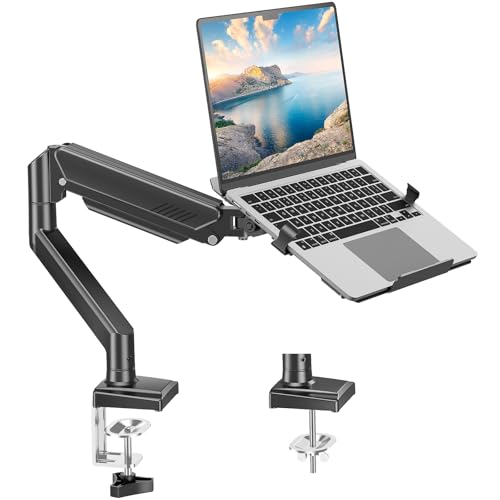
The MOUNT PRO 2-in-1 design is aimed at desk users who want both laptop and monitor support. It holds up to 22 lbs on the laptop side and supports monitors up to 4.4–22 lbs with appropriate tray removal, depending on your setup. Tilt from -45° to +90°, swivel 180°, and rotate 360° for ergonomic comfort. Best for: buyers who plan to elevate both laptop and monitor and want precise motion control. Why selected: robust full-motion options and a high weight capacity. Caution: ensure the desk surface and frame can handle dynamic movement; this unit is more complex to assemble than single-use mounts and may require more space.
Buying Guide: Key Purchase Considerations
What should you look for when choosing a laptop mount for bed?
- Weight capacity: Ensure the mount can support your laptop’s weight plus any accessories like a cooling pad.
- Mounting method: Decide between under-mattress, desk clamp, or grommet-based installation based on your bed and room setup.
- Adjustability: Look for tilt, swivel, and rotation ranges that align with your preferred viewing angles and posture.
- Airflow and heat dissipation: A ventilated laptop tray or airflow holes help prevent overheating during long sessions.
- 2-in-1 versatility: If you want to use a monitor as well, verify compatibility with monitor sizes, VESA patterns, and weight limits.
- Space and stability: Freestanding desks require floor space; clamp or under-mattress mounts save space but require solid surfaces.
Frequently Asked Questions
- Are bed laptop mounts safe for heavy laptops?
Yes, but always check the weight rating and ensure the device is securely attached or supported by the tray or clamp. - Can I mount a monitor and a laptop on the same arm?
Some models support dual loads; verify the weight limits and VESA compatibility for the monitor side. - Will under-mattress desks damage the mattress?
If used within weight limits and with proper bracing, most designs avoid mattress damage; avoid excessive pressure on spring coils. - Do these mounts require tools for installation?
Most offer tool-free or minimally tool-assisted installation, but some mounting methods require standard tools for a secure fit. - What sizes of laptops are supported?
Many mounts support up to 17″ notebooks; always confirm the maximum laptop width and weight in the product specs. - Can these mounts improve posture?
Yes, by positioning screens at eye level and reducing neck strain; choose a model with adequate height and tilt range.